Chromebook Keyboard Backlight vs Non-Backlit Keyboards: What Schools Actually Need
When schools evaluate devices for students, practical considerations tend to outweigh premium features. Durability, cost control, battery life, and ease of maintenance all play a central role in procurement decisions. In that context, the debate between standard keyboards and the Chromebook keyboard backlight becomes less about aesthetics and more about real-world classroom impact.
While backlit keyboards are often marketed as a productivity upgrade, most K–12 environments still rely heavily on non-backlit designs. Understanding why—and when a Chromebook keyboard backlight actually adds value—can help educators and administrators make more informed purchasing decisions.
Why Keyboard Design Matters in Schools
Students interact with their Chromebooks primarily through the keyboard—writing essays, completing assignments, and participating in online learning platforms. Unlike office users, students often use devices in shared, structured environments where consistency and reliability are critical.
From a school perspective, the keyboard must meet three key requirements:
- Visibility in standard classroom lighting
- Resistance to wear and damage
- Low maintenance and replacement cost
These priorities explain why non-backlit keyboards remain the default in most education deployments.
Non-Backlit vs Chromebook Keyboard Backlight: Core Differences
The difference between these two keyboard types is straightforward, but the implications for schools are significant.
Non-Backlit Keyboards (Standard in Education)
- Rely on ambient lighting (classroom lights)
- Typically use high-contrast key printing
- Simpler internal structure
Chromebook Keyboard Backlight (Less Common in Schools)
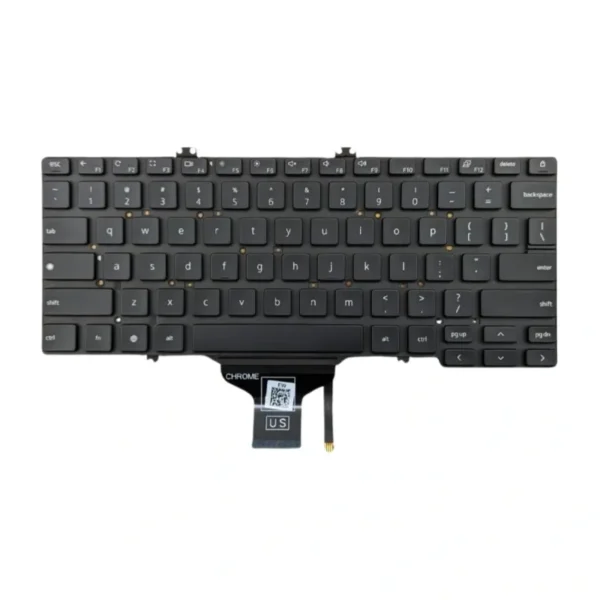
- Uses LED lighting beneath keys
- Designed for low-light visibility
- Adds internal components and power usage
From a purely functional standpoint, both allow students to type effectively—but their suitability varies depending on the learning environment.
Why Schools Prefer Non-Backlit Keyboards
1. Cost Efficiency at Scale
For districts purchasing hundreds or thousands of devices, even a small price increase matters. Devices with a Chromebook keyboard backlight are usually more expensive, making them harder to justify when budgets are tight.
Standard keyboards allow schools to:
- Maximize the number of devices per budget
- Allocate funds to more critical features (battery, durability, support)
- Maintain consistency across classrooms
2. Better Battery Reliability
Battery life is a top priority in education. Devices must last an entire school day without charging interruptions.
Non-backlit keyboards consume no additional power, while a Chromebook keyboard backlight, even if efficient, still draws energy. Across a full day of use, this can make a noticeable difference—especially for older or lower-cost Chromebook models.
3. Higher Durability and Simplicity
Education devices are built to handle drops, spills, and heavy daily use. Simpler hardware generally means fewer points of failure.
A Chromebook keyboard backlight introduces additional components such as LEDs and connectors, which can:
- Increase repair complexity
- Raise replacement costs
- Add potential failure points over time
For IT teams managing large fleets, simplicity is a major advantage.
4. Classrooms Are Already Well Lit
Unlike home or office environments, classrooms are designed with consistent overhead lighting. This largely eliminates the primary benefit of a Chromebook keyboard backlight—visibility in the dark.
In most school scenarios, students:
- Sit in evenly lit rooms
- Work during daytime hours
- Do not require illuminated keys to type effectively
When Chromebook Keyboard Backlight Makes Sense
Although non-backlit keyboards dominate in education, there are specific cases where a Chromebook keyboard backlight can be useful.
1. Older Students and Extended Use
Middle school, high school, and college students are more likely to:
- Work at night
- Use devices at home
- Type in varied lighting conditions
In these cases, a Chromebook keyboard backlight can improve usability outside the classroom.
2. Hybrid and Remote Learning
As learning extends beyond school buildings, lighting conditions become less predictable. Students working in bedrooms, shared spaces, or low-light environments may benefit from illuminated keys.
3. Staff and Teacher Devices
Teachers often use devices for presentations, grading, and communication outside normal school hours. Providing staff with Chromebooks that include a Chromebook keyboard backlight can improve convenience without significantly impacting overall budgets.
Practical Procurement Strategy for Schools
Rather than applying a one-size-fits-all approach, many schools adopt a tiered device strategy:
- Students (K–8): Standard non-backlit keyboards
- Students (High School): Selective use of backlit models
- Teachers/Staff: Higher-spec devices with Chromebook keyboard backlight
This approach ensures that resources are allocated where they provide the most value.
Key Decision Factors for Educators
When deciding between standard keyboards and a Chromebook keyboard backlight, schools should evaluate:
1. Learning Environment
If devices are used primarily in classrooms, non-backlit keyboards are sufficient.
2. Budget Constraints
If cost control is critical, prioritizing non-backlit models allows broader device access.
3. Device Usage Beyond School
If students regularly use Chromebooks at home or at night, a Chromebook keyboard backlight may be worth considering.
4. Maintenance Capacity
Schools with limited IT resources benefit from simpler, more durable hardware.
Conclusion: A Practical Choice for Education
While the Chromebook keyboard backlight offers clear advantages in certain situations, it is not a necessity for most school environments. Standard non-backlit keyboards continue to meet the core needs of students: reliability, visibility in classrooms, and cost efficiency.
For educators and administrators, the decision ultimately comes down to context. If the goal is to deploy durable, affordable devices at scale, non-backlit keyboards remain the most practical choice. However, for older students, hybrid learning, or staff use, selectively investing in Chromebooks with backlit keyboards can provide added flexibility.
In education, the best technology decisions are rarely about having more features—they’re about having the right ones.