Chromebook AUE Explained: What Schools Need to Know in 2026
Managing a fleet of laptops for a school district, a hardware refurbishing business, or an enterprise environment presents a constant challenge: optimizing device longevity against budgeting cycles. In the ChromeOS ecosystem, your deployment strategy is governed by one critical milestone—the Chromebook AUE date (Auto Update Expiration).
If you are a technology director or a B2B procurement manager, understanding this timeline is not just a technical footnote; it is the single most important factor determining your hardware investment return. Below, we break down everything you need to know about navigating the Chromebook AUE ecosystem in 2026, ensuring your network remains secure, compliant, and cost-effective.
What is a Chromebook AUE Date?
AUE Defined: Auto Update Expiration vs. End of Life (EOL)
The Chromebook AUE is the pre-determined date on which Google stops delivering automated operating system updates, browser upgrades, and security patches to a specific device. A common point of confusion is that a device’s update lifecycle is tied to its purchase date. It is not. The Chromebook AUE is strictly determined by the device’s underlying motherboard hardware platform chipset architecture.
If a district purchases a brand-new batch of older-generation devices on a closing contract, those units may reach their update limits far sooner than expected, regardless of how recently they were unboxed.
The Hidden Risk of Running an Expired Chromebook
Once a device crosses its expiration threshold, it ceases to receive Google’s rolling fortnightly safety patches. For K-12 school districts and regulated business networks, this introduces significant liabilities:
Network Vulnerabilities: Unpatched software leaves the entire ecosystem open to modern exploits and data breaches.
Compliance Failures: Devices will fail standard security compliance audits necessary for institutional testing platforms and state funding.
Software Incompatibility: The internal Chrome browser stops updating. Over time, core educational portals, Learning Management Systems (LMS), and enterprise web apps will fail to load or render properly.
Understanding Google’s 10-Year Chromebook AUE Policy
Which Devices Get 10 Years of Automatic Updates?
To alleviate the procurement strain on public and private institutions, Google updated its support matrix. In 2024, Google extended its Auto Update policy to provide up to 10 years of support for newer Chromebook platforms. Originally, Chromebook AUE windows ranged from 3 to 5 years. Google later extended support to 8 years for models launched in 2020 or later. Now, many Chromebook platforms qualify for up to 10 years of automatic updates, depending on the model and launch date. This update radically shifts the financial landscape, giving IT asset managers a much wider window to amortize their initial hardware expenses.
The Catch for Pre-2021 Chromebooks
For fleets composed of legacy hardware platforms engineered prior to 2021, Google offers an option to manually extend the Chromebook AUE support framework out to the 10-year limit via the Google Admin Console. However, this extension requires a deliberate operational compromise.
To maintain baseline processing performance on older processors, activating extended updates completely removes Android App and Google Play Store support. IT directors must carefully weigh the necessity of mobile apps against the value of prolonged browser support before committing a fleet to this route.
How to Find Your Chromebook’s AUE Date
Whether checking a single returned device or validating inventory, locating this milestone is straightforward.
Method 1: Internal System Verification
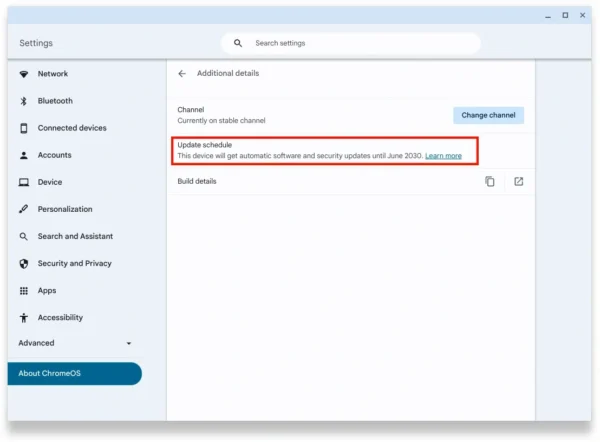
To check the support lifecycle directly from the machine’s interface, use the following sequence:
1.Open Settings:
Click on the Time/Clock status tray in the bottom-right corner of your desktop screen and select the Gear icon to launch system settings.
Look at the left-hand sidebar menu, scroll to the absolute bottom of the list, and select About ChromeOS.
In the center interface panel, locate and click the Additional details row to expand advanced system data.
Look for the Update schedule section. Here, you will find a clear line stating the exact month and year when the device will receive its last automatic patch.
Method 2: Google’s Official Matrix for Fleet Procurement
If you are evaluating wholesale batches of refurbished inventory or comparing supplier bids before the hardware arrives on-site, look up the platform specifications on Google’s official Auto Update Policy directory. By matching the manufacturer (e.g., Lenovo, HP, Acer, Dell) and the specific baseboard chipset identifier, you can map out your multi-year deployment lifecycle before finalizing a purchase order.
Repair vs. Replace: Maximizing Fleet Lifespans
Under the older 3-to-5-year support limits, repairing broken student laptops rarely made financial sense; when a screen cracked or a keyboard failed near year three, the imminent update deadline usually justified scrap recycling.
However, with a guaranteed 10-year Chromebook AUE lifespan on modern architectures, the return on investment (ROI) calculation tilts heavily toward repair.
| Fleet Assessment Metric | Favor In-House Repair | Favor Total Fleet Replacement |
| AUE Horizon | More than 3 years of software support remaining | Less than 12-18 months of support remaining |
| Physical Status | Isolated damage (broken LCD panel, missing keys, dead battery) | Comprehensive structural damage (bent chassis, liquid-damaged motherboard) |
| Component Access | Stable bulk supply lines for OEM-grade or high-quality compatible parts | Rare, obsolete, or prohibitively expensive internal components |
By establishing an organized internal repair workflow using targeted chromebook parts replacement (such as swapping modular keyboards, LCD screens, or internal batteries), technology coordinators can keep units operational for their entire decade-long lifespan, driving down the overall Total Cost of Ownership (TCO).
Asset Options After the Chromebook AUE Limit
When the operational countdown finally reaches zero, you have several options to handle the retired hardware responsibly:
Enterprise and Educational Fleet Buyback: Do not simply stack expired laptops in a warehouse. Many B2B IT asset disposition (ITAD) corporations offer structured buyback initiatives. These organizations purchase out-of-warranty and post-support systems to harvest salvageable structural elements, plastic casings, and modular components, allowing you to recover residual capital to fund your next cycle.
Repurpose with ChromeOS Flex: For low-risk environments, such as secondary backup loaner systems or standalone testing terminal kiosks, you can flash the device hardware with ChromeOS Flex. This free, lightweight alternative OS strips out Android utility support but continues to feed updated browser security protocols directly to aging machines.
Transition to Open-Source Linux: For engineering labs or higher-education environments, flashing the firmware to support a lightweight Linux distribution (like Linux Mint) can extend the functional utility of the computing components for years to come.
Frequently Asked Questions Regarding Chromebook AUE
Can we still use our laptops after the Chromebook AUE date passes?
Yes, the hardware will continue to boot up and run local processes. However, it will no longer receive essential security mitigations or features, which increases the likelihood of network security risks and browser rendering errors on modern websites.
Does running a Powerwash reset or bypass the Chromebook AUE parameters?
No. A factory reset (Powerwash) clears local user configurations and cache profiles, but it does not modify the immutable hardware registration dates logged within Google’s central update delivery servers.
Why do identical laptop models sometimes show different expiration schedules?
This occurs when manufacturers issue hardware revisions under an identical product family name while shifting the internal motherboard architecture to a newer, more efficient processing platform midway through production.