Chromebook LCD Bezel Buying Guide: How to Choose the Right Bezel
Choosing the correct Chromebook LCD bezel is more important than many buyers realize. While the bezel may look like a simple plastic frame around the screen, it actually plays a major role in display alignment, webcam support, microphone functionality, and the overall fit of the laptop assembly. Buying the wrong Chromebook LCD bezel can lead to installation problems, loose fitting, blocked sensors, or missing features even if the Chromebook model appears to match.
Because manufacturers often release multiple bezel versions for the same Chromebook series, customers should never assume that all bezels are interchangeable. Small design differences such as IR camera support, latch structure, microphone openings, and logo style can determine whether the replacement works properly with the device.
This Chromebook LCD bezel buying guide explains the key factors you should check before purchasing so you can confidently choose the correct replacement for your Chromebook.
IR Camera Compatibility
One of the first things to check when selecting a Chromebook LCD bezel is whether your device uses an IR (infrared) camera system. An IR camera is different from a standard webcam because it uses infrared sensors to improve image detection, support facial recognition, or enhance video conferencing performance in low-light environments.
Some Chromebook models include additional sensors near the webcam area, and the bezel must have the correct cutouts to accommodate them. If the bezel lacks the proper openings, the camera system may not function correctly after installation.
A good reference example is the Dell Chromebook 3420/3430 bezel, part number 0RCMKN. This version is designed specifically for systems equipped with an IR camera configuration. Compared with a standard bezel, it includes additional sensor windows around the webcam section.
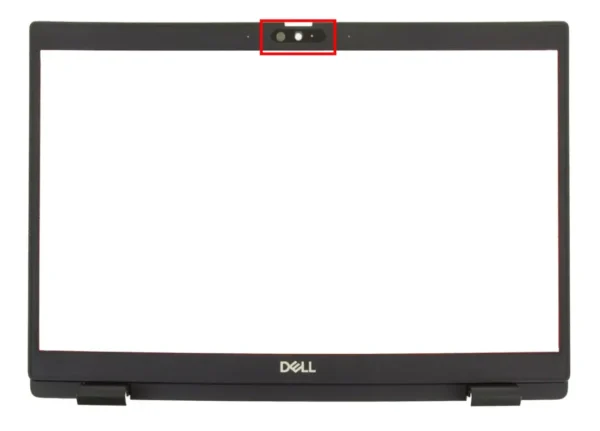
Why does this matter to buyers? If you accidentally install a standard bezel on a Chromebook that requires IR support, the infrared sensors may become blocked or misaligned. This can affect video quality, authentication features, or camera performance during online meetings and classes.
To identify the correct type, inspect the top center area of your original bezel carefully. A standard bezel usually has only one camera opening, while an IR-compatible Chromebook LCD bezel may include multiple dark sensor windows or transparent sections near the webcam. Comparing your original bezel to listing photos is one of the safest ways to confirm compatibility.
Latch Mechanism Differences
Another important factor in choosing the correct Chromebook LCD bezel is the latch mechanism. The latch helps secure the Chromebook when the lid is closed and ensures the display assembly aligns properly with the keyboard section.
Some bezel designs include integrated latch supports, while others do not. Even within the same Chromebook model family, manufacturers may use different bezel structures depending on production revisions or chassis configurations.
The HP Chromebook 14 G6 is a perfect example of this difference. Part number L90416-001 is a bezel version without a latch, while part number M01026-001 includes the latch mechanism built into the bezel structure.
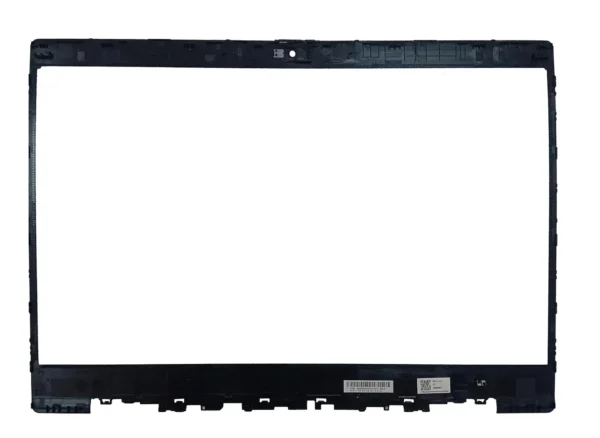
(HP Chromebook 14 G6 LCD Bezel without Latch L90416-001)
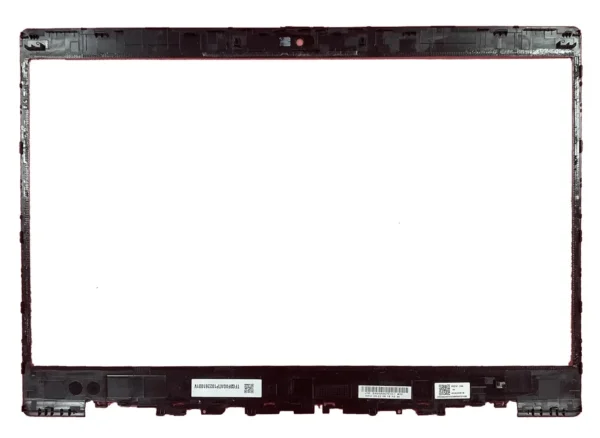
(HP Chromebook 14 G6 LCD Bezel with Latch M01026-001)
This difference has practical importance. Installing the wrong latch configuration may cause the Chromebook lid to close unevenly or fail to stay securely shut during transport. In classrooms, offices, and travel situations where the device is frequently opened and closed, the latch system directly affects durability and user experience.
When examining your existing Chromebook LCD bezel, check the inner mounting areas carefully. A latch-equipped bezel often includes additional reinforcement points or mounting brackets near the center edge of the frame. If your original bezel has these features, you should purchase the same latch version rather than assuming all HP 14 G6 bezels are identical.
Many buyers focus only on screen size and model number, but latch compatibility is just as important for achieving a proper fit.
Microphone Hole Configuration
Microphone hole placement is another detail that buyers commonly overlook when ordering a replacement Chromebook LCD bezel. Some Chromebook models use dual microphones or enhanced audio pickup systems that require additional openings in the bezel.
These microphone holes are usually located near the webcam area and may appear as tiny pinholes molded into the plastic frame. Although the difference looks small, it can significantly affect audio performance during online communication.
A common example can be found on the Dell Chromebook 3110. Part number 6C2J6 is a bezel version without the extra microphone hole, while part number W5W31 includes an additional microphone opening for systems with enhanced audio configurations.
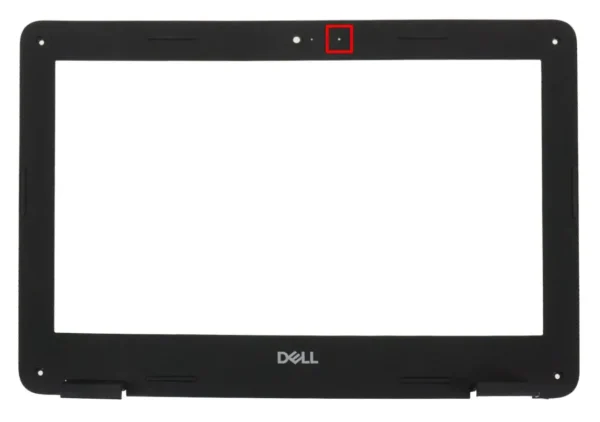
(Dell Chromebook 3110 LCD Bezel without extra mic hole 6C2J6)
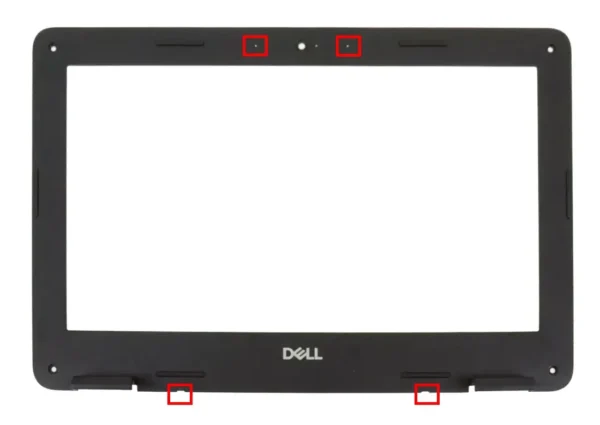
(Dell Chromebook 3110 LCD Bezel with extra mic hole W5W31)
This matters because modern Chromebooks are heavily used for remote learning, Zoom meetings, Google Meet calls, and voice recording. If the replacement Chromebook LCD bezel blocks one of the microphones, users may experience muffled voice pickup, reduced noise cancellation performance, or unclear audio during conversations.
To identify the correct bezel, compare the webcam and microphone section of your original part carefully. Count the visible microphone holes and match them exactly with the replacement listing photos. Even one missing opening can indicate a different bezel version that may not fully support your Chromebook’s audio hardware.
Buyers who skip this step often discover the issue only after installation, when microphone quality suddenly becomes worse.
With or Without Logo
Another feature to consider when purchasing a Chromebook LCD bezel is whether the bezel includes a manufacturer logo. Some bezels are produced with printed or molded branding, while others are completely blank.
From a functional perspective, logo presence usually does not affect performance. However, it can make a noticeable difference in appearance, especially for users who want the replacement to match the original factory look as closely as possible.
For schools, repair shops, and businesses managing multiple devices, logo-free bezels are sometimes preferred because they create a cleaner and more uniform appearance. On the other hand, individual users may prefer a bezel with the original manufacturer branding to maintain the authentic design of the Chromebook.
Logo style can also help buyers distinguish between OEM-style and aftermarket replacement parts. When reviewing a replacement listing, carefully compare the front surface of your original Chromebook LCD bezel with the product photos to confirm whether the logo configuration matches your expectations.
Final Tips Before Buying a Chromebook LCD Bezel
Before purchasing any Chromebook LCD bezel, always compare your original part carefully rather than relying only on the Chromebook model name. Features such as IR camera compatibility, latch mechanism type, microphone hole layout, and logo design can vary even within the same product series.
Whenever possible, match both the Chromebook model and the original part number. The Dell 3420/3430 0RCMKN, HP 14 G6 L90416-001 and M01026-001, and Dell 3110 6C2J6 and W5W31 examples show how small physical differences can have a major impact on compatibility and functionality.
By checking these details before ordering, you can avoid installation issues, maintain your Chromebook’s original features, and ensure your replacement Chromebook LCD bezel fits properly and performs exactly as intended.