Laptop Keyboard Buying Guide: How to Choose the Right Keyboards
This guide explains the key factors you need to understand before buying a laptop keyboard, including layout differences, hardware specifications, and structural details that affect compatibility and daily use. It’s designed to help you evaluate the right option beyond just matching a part number.
1) Keyboard Layout Differences by Region
Before comparing layouts, confirm which keyboard type you need, as keyboard designs vary by country. Always choose a layout that matches your region or your customers’ language requirements to ensure proper fit and a familiar typing experience.
United States (ANSI Layout)
Physical characteristics:
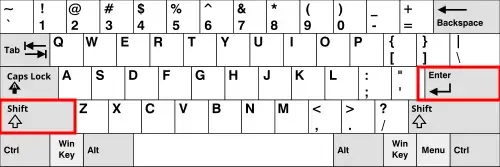
- Wide, horizontal Enter key
- Long left Shift key
- No extra key beside Shift
Typing and buying impact:
- Standard layout for the U.S. market
- Most widely available replacement option
- Preferred for general use and programming
- Easier to source and match with existing devices
United Kingdom (ISO Layout)
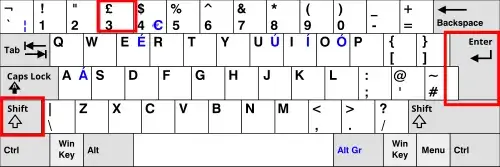
Physical characteristics:
- Tall, L-shaped Enter key
- Shorter left Shift with an extra key beside it
- Dedicated £ symbol
Typing and buying impact:
- Designed for UK typing conventions
- Different key spacing affects both typing and physical fit
- Not interchangeable with US layout even if connectors appear similar
Germany (QWERTZ Layout)
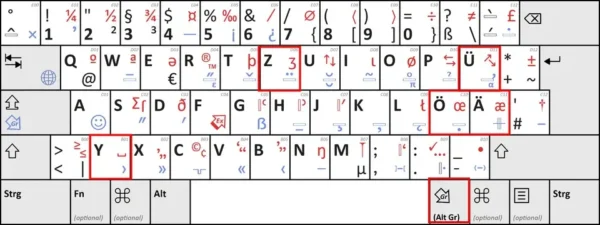
Physical characteristics:
- Z and Y keys swapped
- Additional keys for ä, ö, ü
- Modified symbol input using AltGr
Typing and buying impact:
- Optimized for German language input
- Requires adjustment for users familiar with QWERTY
- Must match language needs to maintain typing efficiency
If you need to compare additional regional layouts beyond the ones listed here, you can refer to a comprehensive keyboard layout reference for more variations worldwide.
2) Core Hardware Specifications That Affect Compatibility
Laptop keyboards feature different buttons like “Power” or “Lock” based on their design, intended use case, and the device they are built for.
Power Button Integration
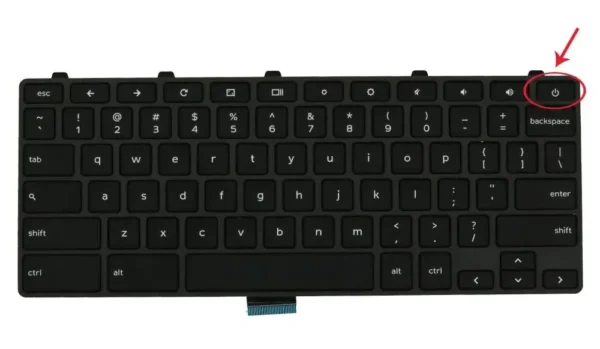
- Some keyboards include a built-in power button, typically located in the top-right area
- Others rely on a separate power button on the laptop chassis
Why it matters:
If the original keyboard includes a power button, the replacement must match. Otherwise, basic device operation may be affected.
Lock Button Integration
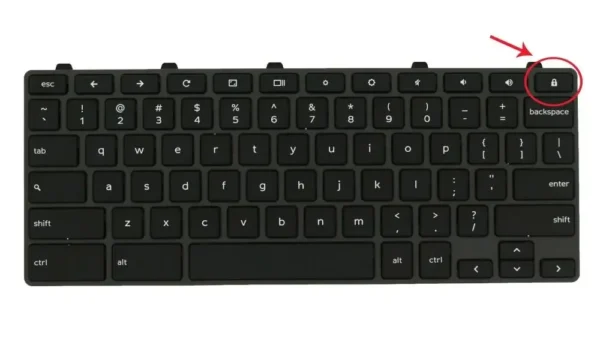
- Some designs include a dedicated lock key (for screen lock or system lock functions)
- Placement varies depending on manufacturer and system design
Why it matters:
While not always critical for power control, the presence or absence of a lock button affects usability and shortcut behavior, especially in enterprise or education environments.
Backlit vs Non-Backlit
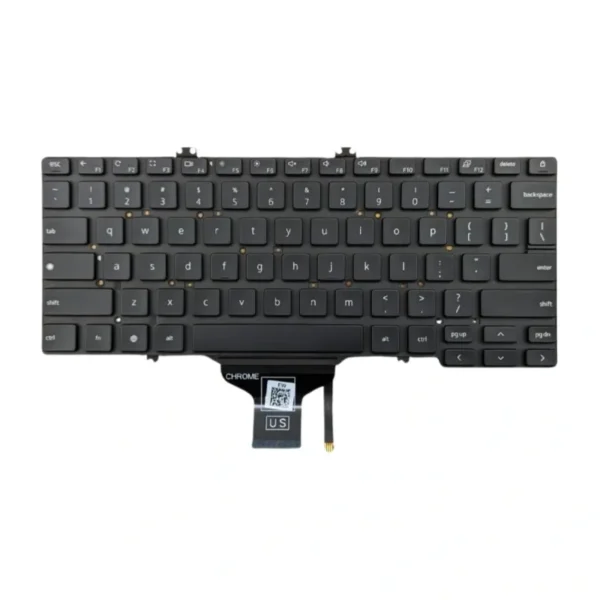
- Backlit keyboards include a lighting layer and require motherboard support
- Non-backlit keyboards have a simpler structure and are more common in education and bulk deployments
Why it matters:
Backlit versions will not function correctly if the system does not support lighting. Non-backlit keyboards are typically more stable and cost-effective.
Ribbon Cable (FPC) Design
- Differences in position (center, left, right)
- Variations in pin count, width, and orientation
Why it matters:
This is one of the most critical compatibility factors. A mismatch will prevent the keyboard from working even if the layout and appearance are correct.
Mounting Structure
- Screw-fixed designs
- Plastic melt points or riveted installation
- Metal backplate vs flexible backing
Why it matters:
The mounting structure determines whether the keyboard can be installed securely without modification.
Top Row Function Keys
- Layout varies depending on operating system and device type
- Icons and shortcuts are system-specific
Why it matters:
Incorrect top-row configuration can result in mismatched or non-functional shortcut keys.
3) Additional Factors That Influence Buying Decisions
Typing Feel and Key Travel
- Most laptop keyboards use scissor-switch mechanisms
- Key travel typically ranges from 1.0 to 1.5mm
Why it matters:
Maintaining a familiar typing feel improves comfort and reduces adjustment time after replacement.
Durability and Use Case
- Reinforced designs are common in education-focused devices
- Consumer models may prioritize thinness
Why it matters:
Durability affects long-term reliability and replacement frequency, especially in high-use environments.
Noise Level
- Scissor-switch keyboards are generally quiet
- Slight differences exist depending on build quality
Why it matters:
Lower noise levels are preferred in shared environments such as offices and classrooms.
4) How to Choose the Right Keyboard
To ensure compatibility and reduce purchasing risk, focus on matching:
- Laptop model or compatible series
- Regional layout (US, UK, German, etc.)
- Ribbon cable design and position
- Backlit or non-backlit configuration
- Power and lock button presence
- Mounting structure
Final Thoughts
Buying a laptop keyboard requires attention to structural and functional details that go beyond part numbers. Layout differences affect both typing experience and physical fit, while hardware specifications determine whether the keyboard will function correctly. Understanding these factors helps ensure a smooth replacement process and avoids common compatibility issues.