Laptop Battery Buying Guide: How to Choose the Right Battery
Choosing the correct laptop battery requires more than just knowing your laptop model. Many models have multiple internal configurations, and small differences in specifications can lead to compatibility issues. This guide explains exactly what information you need to confirm before purchasing, so you can avoid ordering errors and ensure a proper fit.
1. Part Number Requirement
The part number is the most reliable way to identify the correct laptop battery. It is assigned by the manufacturer and corresponds to a specific design, including shape, connector type, and electrical compatibility.
You can typically find the part number:
- Printed on the battery label
- Inside the laptop after removing the bottom cover
- In official service documentation
Why it matters:
Laptop model names are often too broad. A single model may ship with different batteries depending on production batch or configuration. The part number eliminates this uncertainty by pointing to an exact match.
In practice, matching the original part number is the safest and most direct way to ensure compatibility.
2. Battery Model Number Requirement
The laptop battery model number helps identify the general battery series or family. Unlike the part number, it is not always unique to a single configuration.
Why it matters:
A battery model number may include multiple variants that differ in:
- Capacity
- Internal cell structure
- Connector orientation or cable design
For example, the part number of Asus C204EE’s battery is 0B200-03370200, it have different battery model number as C31N1836 and C31N1836-1 which shows different capacity.
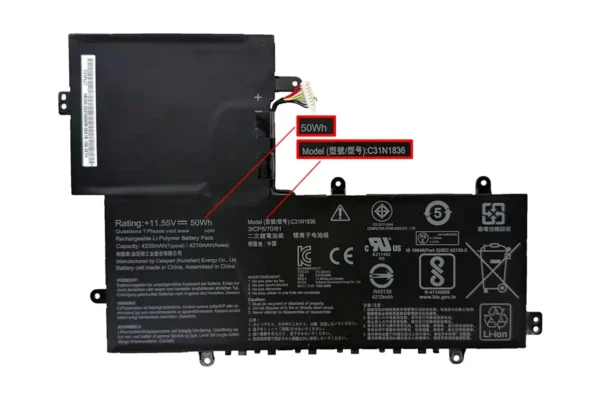
- C31N1836 battery (50Wh)
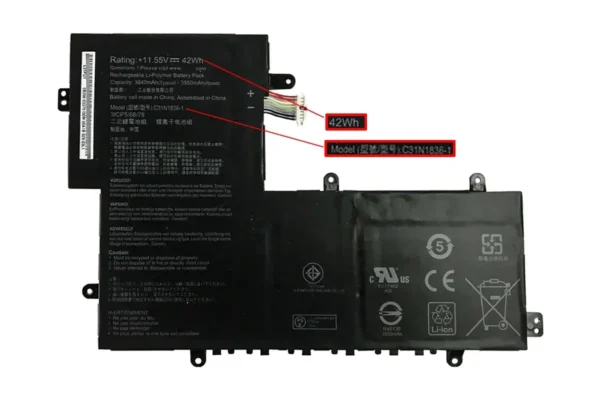
- C31N1836-1 battery (42Wh)
In purchasing decisions, the model number is useful for narrowing down options, but it should always be confirmed alongside part number and detailed specifications.
3. Power (Wh) Specification
Laptop battery capacity is measured in watt-hours (Wh), and it directly determines how long your laptop can run on a single charge.
Even within the same battery model, capacity can vary.
For example, the Asus C204EE / C204MA / C214MA (TOUCH) / CX1101CMA Battery is available in:
- 42Wh version
- 50Wh version
Practical differences:
- A higher Wh rating provides longer runtime
- A lower Wh version may be used in configurations with space or thermal constraints
Why choosing the correct Wh matters:
- Some laptops are designed for a specific capacity only
- Using the wrong version may result in:
- Fitment limitations
- Reduced expected runtime
- Inconsistent system readings
For most cases, matching the original battery’s Wh rating is the most reliable choice unless compatibility with another capacity is clearly confirmed.
4. Battery Cable Length Options
Battery connector design is not standardized across all laptops. Some batteries come with different cable lengths, depending on how the motherboard is positioned inside the device.
A common example is the Dell Chromebook 3100 battery:
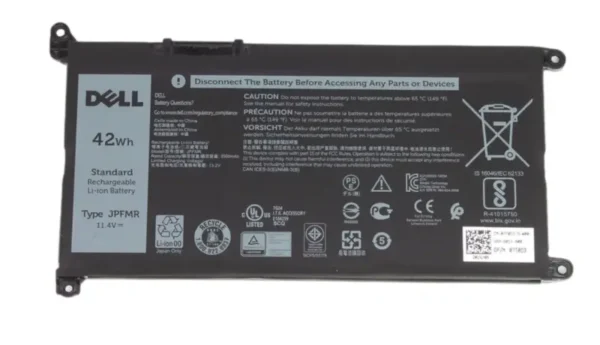
- The 016DPH battery is equipped with short cable #7PR30
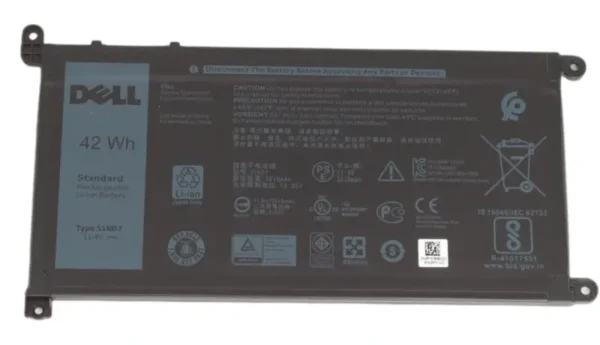
- While the 0FY8XM battery is required long cable #9MJG6
Why this matters:
- A cable that is too short will not reach the connector
- A cable that is too long may not route properly inside the chassis
Potential issues with incorrect cable length:
- Installation failure
- Cable stress or damage
- Unstable connection over time
Before purchasing, it is important to compare the cable length and routing of your original battery.
5. Battery with or without LCD Bracket
Some laptop batteries are designed with an attached LCD bracket (mounting frame), while others are supplied without it.
This is a structural component used to secure the battery within the chassis and align it with other internal parts.
For example, the KT.00305.003 battery is available in versions:
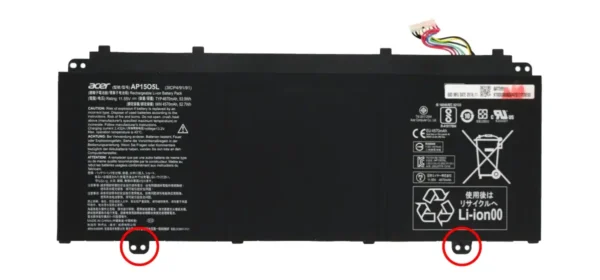
- With LCD bracket
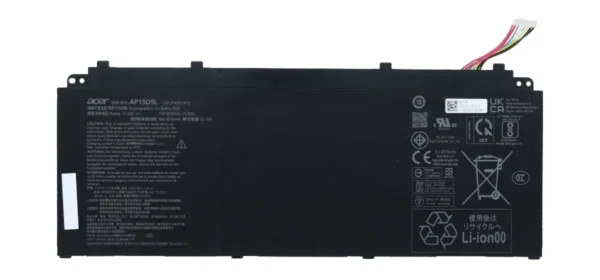
- Without LCD bracket
Why this matters:
- If your original battery includes a bracket, a replacement without it may not mount correctly
- If your device uses a separate bracket, buying a version with a built-in bracket may create fitment conflicts
Choosing the wrong version can lead to:
- Improper installation
- Loose or unstable battery placement
- Additional disassembly to transfer parts
It is recommended to visually confirm whether your original battery includes a bracket before ordering.
6. Logo Customization Option
Replacement batteries are commonly available in two versions:
- With manufacturer-style logo
- Without logo (neutral labeling)
Functional differences:
There is no difference in performance or compatibility between these options.
Practical considerations:
- Logo versions may be preferred for refurbishment or resale
- Pricing and lead time may vary depending on supply
This choice is primarily based on presentation and sourcing preference rather than technical requirements.
Final Checklist Before You Place an Order
Before completing your purchase, make sure you have confirmed the following details:
- Part number matches your original battery
- Battery model number is correct and verified with specifications
- Power rating (Wh) matches your original battery
- Cable length and connector layout are correct
- LCD bracket requirement (with or without bracket) is confirmed
- Logo preference is selected based on your needs
Final Note
Laptop battery may appears similar at first glance, but differences in specifications can significantly affect compatibility and installation. Taking a few minutes to verify these details ensures a smoother purchasing process and helps avoid unnecessary returns.
If needed, using a clear photo of your original battery label and structure is often the most efficient way to confirm all required specifications at once.